How to send a fax online
How to send a fax online
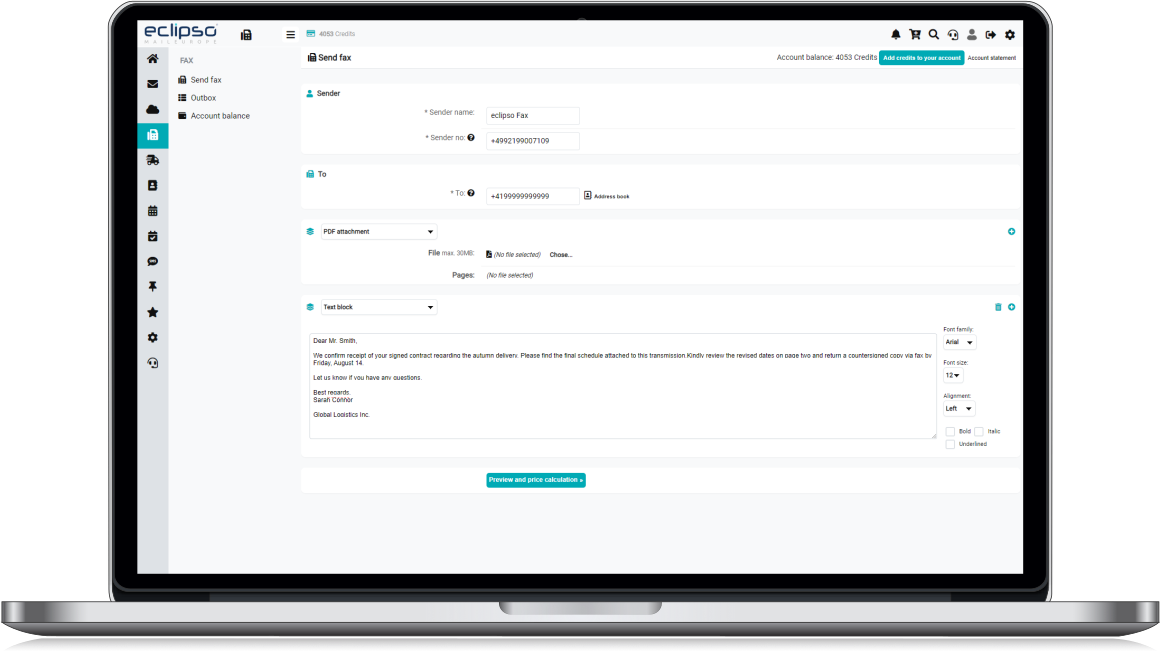
eclipso Fax is a simple and convenient way to send fax messages directly from your computer. You only need an internet connection and no fax machine of your own. You can create faxes from text blocks, a cover page and an uploaded PDF file. Important: Check the recipient's fax number carefully. The price and page count are shown before the fax is sent.
How does fax sending work?
- Open Fax in the desktop menu.
- Create the fax directly in the fax editor or upload an existing PDF document.
- Enter the recipient's fax number. International numbers must use the required format.
- Click Preview and price calculation.
- Check the generated PDF preview, page count and displayed price.
- Click Send fax when all details are correct.
Main fax menu
How can I send a PDF document as a fax?
You can upload an existing letter as a PDF file. The document is checked and then included in the fax file. The PDF may be up to 30 MB and must be a valid, unencrypted PDF document.
We recommend PDF files from version 1.3. Many PDF applications show the PDF version in the document properties or file information.
Security tip: Open the PDF in a PDF application before uploading it and check that all pages and contents are displayed correctly.What do I need to know about signatures and overlays in PDFs?
Many PDF applications and signature apps store a signature, stamp, markup or other overlay as a separate PDF annotation. Such elements may be visible in the PDF application without being part of the actual page content. These separate annotations may not be included when the fax preview is generated.
To ensure that a signature or overlay remains visible in the fax, embed it permanently into the page content before uploading the file. This is often called Flatten, Flatten annotations, Embed overlay or Export as final PDF.
If you use Genius Sign or similar tools:
- Add the signature or overlay as usual.
- Then use a function such as Export as final PDF, Embed overlay or Flatten, if available.
- If no such function is available, choose Print and then Save as PDF or Microsoft Print to PDF.
- Upload the newly created PDF and check the displayed preview.
Simply using "Save as" or "Save a copy" may not be sufficient. The signature may remain a separate annotation and may be missing from the fax preview.
Which PDF files cannot be processed?
The following PDF files cannot generally be processed:
- encrypted or password-protected PDF files
- PDF files with a digital signature
- invalid or damaged PDF files
- PDF files with overlays, stamps, comments or form fields that have not been embedded into the page content
- PDF files larger than 30 MB
A legal digital signature is not the same as a visible handwritten signature saved as an image or embedded page content. Digital signatures must be removed before uploading. A visible signature can be used if it has been permanently embedded into the page content.
Other possible error sources and causes:
- If necessary, complete your sender details in the Settings menu.
- Check the recipient's fax number, including country and area code.
- The PDF document is corrupt, damaged or badly formatted.
- The PDF contains encryption, password protection or a digital signature.
- An overlay, stamp, comment or form field has not been embedded into the page content.
- The PDF file is too large or exceeds the technical limits of the document.
- The fax gateway or connection is temporarily unavailable. Please try again later.
How are the costs calculated?
Payment is made with eclipso Credits. The price is calculated per fax page and may vary depending on the destination country and prefix. After entering the recipient's fax number and clicking Preview and price calculation, the page count and actual price are displayed.
The fax is only sent after you confirm it. Sufficient credit is required. Available payment methods include Klarna / Sofort.com, PayPal and advance payment. With advance payment, the credit is added after the payment has reached our account.
Where can I find the fax status?
A copy of the sent fax is saved in the Journal. There you can find the fax number, sending date and current status. Depending on the gateway response, the status may initially be shown as Sending until a final status message is received.
What happens if a fax cannot be sent?
In the event of a transmission error, the status is updated in the Journal. Refunds are handled according to the settings that apply to fax sending. First check the recipient's fax number and the PDF file. If there is a temporary technical problem, try sending the fax again later.
How do I pay for fax sending?
Before sending a fax, top up your eclipso account with Credits. The top-up process is secure and simple because we do not store bank details. Your credit balance remains valid indefinitely.
Related articles:
- Why isn't my fax being sent? Fax errors and fax status in the fax journal. ↗
- What are credits and what can I use them for? ↗
- Top up your account with credits - How does it work? ↗